Session Replay Privacy in 2026: CIPA, GDPR, Consent, and Data Retention
Session replay has become one of the most useful tools in a modern product team’s toolbox.
A developer sees a customer reporting that a button doesn’t work. A product manager wants to understand why people abandon checkout. A UX designer wants to know why users keep opening the same menu and then backing out.
Traditional analytics can tell you that something happened.
Session replay can help you see how it happened.
You can watch a user’s journey through a website or application, see where they clicked, what they interacted with, how far they scrolled, and sometimes even what they entered into a form. That context can turn hours of guessing into a few minutes of investigation.
But there’s a problem.
The same technology that gives product teams such detailed visibility into user behavior can also collect far more information than they intended.
A session replay script doesn’t inherently know that a particular piece of text is sensitive. It doesn’t know that a particular page contains financial information. It doesn’t know that the value someone typed into a field is private.
Unless you tell it.
And if the replay system sends that information to a third-party service before you have a chance to filter it, the privacy question isn’t theoretical anymore.
This is why session replay privacy has become a much bigger issue in 2026.
In the United States, session replay technology has been targeted by lawsuits involving state and federal privacy and wiretapping laws. The legal outcomes have not been uniform, but recent cases show that courts are taking claims involving detailed session recording seriously.
In Europe, France’s data protection authority, the CNIL, went a step further in February 2026 by publishing a draft recommendation specifically addressing session replay tools. The recommendation discusses consent, transparency, data minimization, masking, identifiers, retention, deletion and access controls. (CNIL)
The takeaway isn’t that session replay is going away.
It is that “install the script and record everything” is becoming a difficult approach to justify.
A better model is emerging:
Understand what you need to record. Get consent where required. Prevent unnecessary data from leaving the browser. Protect what you do collect. Keep it only as long as you need it.
Let’s look at what that means in practice.
What exactly does session replay record?
It is useful to start with the technology because “session recording” can sound more invasive than it actually is—or less invasive than it actually is.
Most modern session replay systems aren’t simply recording a video of the user’s screen.
Instead, JavaScript running in the browser observes events and changes that occur during a session. Depending on the implementation, that can include mouse movements, clicks, scrolling, page navigation, DOM changes, touch interactions, form interactions and other information needed to reconstruct the experience.
The replay system can then reconstruct those events in a dashboard that looks much like watching a video.
The CNIL describes session replay tools in similar terms, noting that they can recreate a user’s browsing journey and capture interactions such as mouse movements, touch interactions, clicks, scrolling and, in some circumstances, form inputs. (CNIL)
That distinction matters because a replay system can potentially capture information that a traditional page-view analytics system never sees.
For example, analytics might tell you:
1,250 users visited the checkout page.
Session replay might help you discover:
37 users repeatedly clicked the “Pay Now” button, but nothing happened.
That’s extremely valuable.
But what if a user typed their email address, phone number or credit card information while the replay system was watching?
Now you’re dealing with a very different kind of data.
The question isn’t whether session replay is useful.
It clearly is.
The question is:
How much information does your implementation actually need to collect to provide that usefulness?
Why session replay is attracting legal attention
For years, session replay was treated like many other analytics technologies.
Add a JavaScript snippet.
Start collecting data.
Send it to a vendor.
Look at the results.
Privacy policies might mention analytics somewhere in the footer, but the recording itself often began as soon as the page loaded.
That model is increasingly being challenged.
There are two separate but related developments driving the change.
The first is litigation in the United States.
The second is increased regulatory attention to tracking technologies in Europe.
Neither means that session replay is automatically illegal.
That’s an important point.
There is no universal rule that says every session replay implementation violates U.S. wiretapping laws.
There is also no single GDPR provision that can be summarized as “session replay is illegal.”
The actual answer depends on the technology, jurisdiction, purpose, data collected, consent mechanism and legal framework involved.
But the direction is clear enough that companies should stop treating privacy as an optional configuration.
CIPA and the U.S. session replay lawsuits
One of the most important U.S. laws involved in session replay litigation is the California Invasion of Privacy Act, commonly known as CIPA.
CIPA dates back to 1967, long before JavaScript, smartphones, web applications or session replay existed.
That hasn’t stopped plaintiffs from arguing that certain modern tracking technologies can fall within the law’s restrictions.
The theory behind many of these lawsuits is relatively straightforward.
A visitor believes they are interacting with a website.
The website has embedded a third-party session replay script.
That script records the visitor’s actions and transmits information to an outside provider.
The plaintiff argues that the third party has effectively intercepted a communication or interaction without the required consent.
The technical details matter enormously.
- What exactly was captured?
- When was it captured?
- Where did it go?
- Who received it?
- Was it readable while being transmitted?
- Was the vendor acting as an independent third party or merely as an agent of the website operator?
These questions have produced different results in different cases.
And that’s why claims such as “session replay violates CIPA” are too simplistic.
A more accurate statement is:
Certain session replay implementations have been challenged under CIPA and other privacy laws, and courts have reached different conclusions depending on the facts.
Two recent cases illustrate why.
What the 2025 Torres v. Prudential decision tells us
In April 2025, a federal court in California considered a CIPA claim involving session replay technology used on Prudential’s website.
The plaintiffs alleged that session replay software captured information from an online form used to request a life insurance quote.
The court granted summary judgment to the defendant on the CIPA Section 631 claim at issue.
One important part of the court’s reasoning was that the replay events did not become readable content until after they had been stored and reassembled into a session replay. In other words, the particular technology and data flow did not satisfy the court’s interpretation of CIPA’s requirement that information be read or attempted to be read while “in transit.” (Inside Privacy)
That’s significant.
But it doesn’t mean:
Session replay is safe under CIPA.
It means:
That particular implementation did not satisfy that particular CIPA theory under the facts presented.
This distinction is easy to miss when reading summaries of privacy litigation.
A court decision about one technical architecture doesn’t automatically establish a rule for every session replay vendor.
And another case demonstrates exactly why companies shouldn’t rely on a single favorable decision as their privacy strategy.
The 2026 Bass Pro Shops and Cabela’s session replay case
In May 2026, the U.S. Court of Appeals for the Third Circuit issued an important decision in litigation involving Bass Pro Shops and Cabela’s.
The case involved third-party session replay code embedded on the retailers’ websites.
The plaintiffs alleged that the technology captured detailed interactions including mouse movements, clicks, scrolling, keystrokes and text entries. According to the allegations described by the court, the replay code operated at very high frequency and could capture text entered into fields even when a user didn’t press “submit” or “enter.” The third-party providers also stored the collected data on their own servers. (Justia Law)
That level of detail is exactly why session replay deserves careful privacy engineering.
The plaintiffs alleged violations of federal and state privacy laws, including the federal Wiretap Act.
The district court had dismissed the case for lack of Article III standing.
The Third Circuit reached a more nuanced conclusion.
It reversed the dismissal for two plaintiffs who had made purchases and entered information including names, addresses and payment information. It affirmed dismissal for six other plaintiffs who had browsed the websites but had not provided identifying information. (Justia Law)
Again, the decision does not say that all session replay is illegal.
But it does demonstrate something important:
The amount and nature of information captured by replay technology can matter.
It also shows why companies should understand exactly what their replay SDK is doing.
You shouldn’t have to guess.
What recent U.S. cases do—and don’t—mean
It’s tempting to read the headlines and conclude that session replay has become illegal.
That’s not what the cases establish.
They do not mean:
- Every session replay implementation violates CIPA.
- Every third-party analytics vendor is automatically considered an illegal wiretapper.
- Every website must obtain the same form of consent.
- Session replay must be deleted after exactly 30 or 90 days.
- Using a session replay tool is inherently unlawful.
What they do show is that session replay can create meaningful legal exposure depending on how it is implemented.
That means companies should be able to answer basic questions about their own implementation:
- What does the SDK capture?
- When does it start capturing?
- Where is the data sent?
- Does the vendor receive raw information?
- What gets masked before transmission?
- How long is the data stored?
- Who can access it?
If nobody on your team can answer those questions, that’s a bigger problem than whether your analytics dashboard looks good.
Europe is taking a closer look at session replay too
The U.S. litigation isn’t the only reason session replay privacy deserves attention.
In February 2026, France’s data protection authority, the CNIL, launched a public consultation on a draft recommendation specifically concerning session replay tools.
That’s notable because the document isn’t generic advice about analytics.
It is specifically about session replay.
The CNIL says session replay tools can provide detailed visibility into users’ online behavior and can potentially be intrusive. Its draft addresses practical questions around data minimization, informing users, consent, technical configuration and the responsibilities of both session replay providers and organizations using them. (CNIL)
The consultation closed on April 22, 2026, after which the CNIL said it would review contributions and adopt a final version. (CNIL)
That timing matters.
The document should be understood as draft guidance, not as a new GDPR regulation.
But it is still valuable because it gives companies a detailed look at how a major European privacy regulator is thinking about session replay.
And the direction is clear:
Collect less. Explain more. Give users meaningful control. Protect sensitive information. Limit retention.
Does session replay require consent?
This is probably the question product teams ask most often.
The honest answer is:
It depends.
The legal requirements vary by jurisdiction and by the specific technology and purpose involved.
For organizations operating in France, however, the CNIL’s 2026 draft recommendation takes a strong consent-first approach.
The draft says that, unless an applicable exemption exists, the reading or writing of information on a user’s device associated with session replay requires prior consent. It also addresses how information about session replay should be presented through consent management mechanisms. (CNIL)
That has a very practical engineering implication.
If your implementation requires consent, don’t do this:
Page loads → replay SDK starts → user sees consent banner → user decides whether to allow tracking.
By then, you’ve already collected data.
Instead:
Page loads → consent state is determined → replay remains disabled unless the required consent exists → replay initializes only after consent.
That’s the difference between a consent-first architecture and a consent-themed architecture.
Consent should happen before the replay SDK starts
This is one of the most important implementation details.
Suppose your website uses a consent management platform.
A visitor arrives.
The CMP hasn’t received a decision yet.
If the replay SDK is already loaded and collecting events, your system has already crossed the line you’re trying to control.
A safer architecture looks like this:
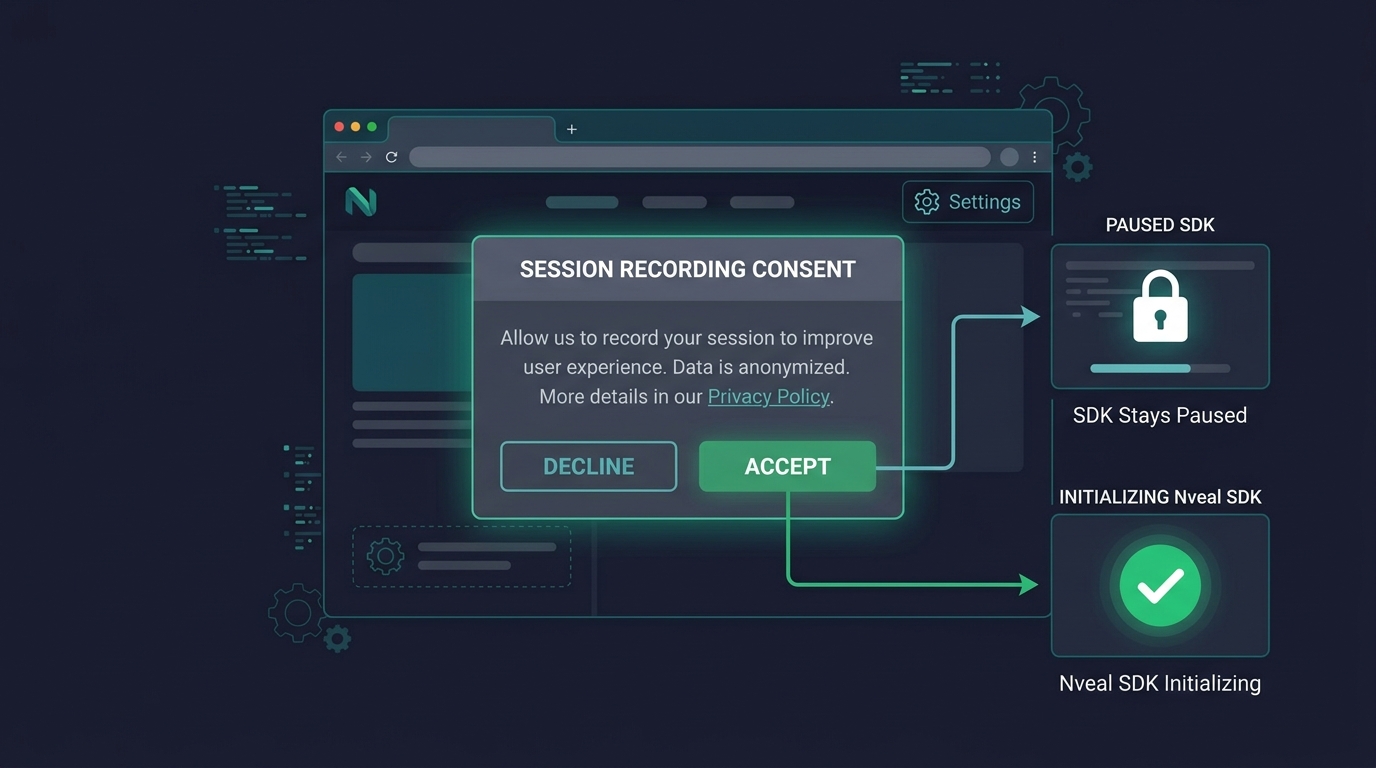
The important point is that consent isn’t merely a setting inside the replay dashboard.
It needs to control whether recording happens in the first place.
This is particularly important for organizations serving users across multiple jurisdictions.
A consent architecture should be designed with the applicable legal requirements in mind rather than assuming one global rule will work everywhere.
How Nveal Handles Consent
The Nveal SDK is designed for consent-first architectures. It will not initialize or begin recording until you explicitly call nveal.init(). This makes it simple to integrate with your existing Consent Management Platform (CMP). Wait for the user to grant permission, and then start the SDK.
Don’t confuse a privacy policy with consent
Another common mistake is relying on a Privacy Policy to solve the problem.
A Privacy Policy can explain what your company does.
It doesn’t automatically mean that a visitor has given consent for every tracking technology you use.
There is a big difference between:
“Our Privacy Policy says we use analytics.”
and:
“The user was given the appropriate choice about this specific type of tracking before it began.”
If consent is the applicable requirement for your implementation, the latter is the important part.
The CNIL’s draft recommendation discusses both transparency and how consent can be collected, including the role of consent management platforms. (CNIL)
That makes the consent interface part of the product architecture—not just a legal page.
Data minimization: record what you need, not everything you can
Consent isn’t the only privacy control.
The other major principle is data minimization.
Imagine that you’re investigating why users abandon a signup flow.
You might need to know: * Which field they interacted with * Whether validation failed * Whether an error appeared * Whether they clicked Submit * Whether the page navigated successfully
Do you need to know the exact value they entered?
Probably not.
If the answer is no, don’t collect it.
This sounds obvious, but session replay makes over-collection easy because the technology is capable of seeing so much.
A privacy-first implementation asks:
What information is necessary to answer the product question?
Then it configures the replay system accordingly.
The CNIL draft explicitly emphasizes the principle of minimization: organizations should collect information that is useful for the purpose being pursued. (CNIL)
That’s a useful engineering principle regardless of the regulatory environment.
Client-side masking is better than cleaning data later
Here’s an important technical distinction:
Masking data before collection is fundamentally different from hiding it after collection.
Suppose a user enters an email address into a form.
The browser captures the value.
The replay SDK sends it to your ingestion endpoint.
Your server then replaces it with ********.
The dashboard looks safe.
But the sensitive value already left the browser.
Depending on your architecture, it may now exist in: * Network logs * Reverse-proxy logs * Application logs * Message queues * Temporary storage * Database records * Vendor infrastructure * Backups
That’s why privacy controls should be applied as early as possible.
Ideally, sensitive information is excluded or masked inside the browser before the recording payload is transmitted.
The CNIL draft places significant emphasis on masking and protective measures, including masking sensitive fields and dynamically populated information. (CNIL)
The goal isn’t to make the replay useless.
It’s to preserve the interaction while removing information that isn’t necessary.
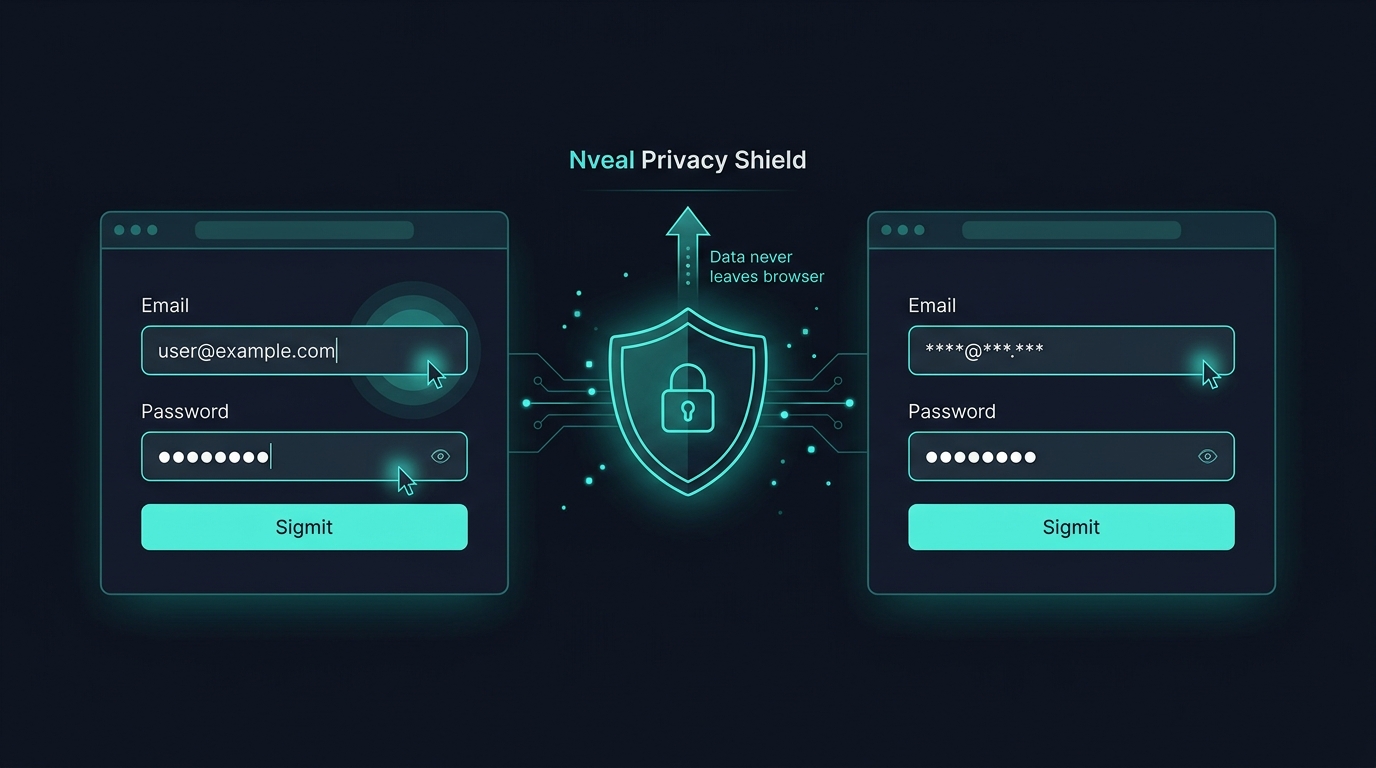
What should session replay mask?
At a minimum, companies should carefully consider: * Passwords * Payment card information * Banking information * Authentication tokens * Personal addresses * Phone numbers * Email addresses * Private messages * Account information * Health information * Government identification numbers * Other application-specific sensitive data
Some of these should be completely blocked rather than merely visually masked.
And that’s an important distinction.
A good privacy implementation should make it easy to configure both:
Mask
and
Block
depending on the type of information.
For example, you might want to preserve the fact that a user interacted with a field while hiding its contents.
But you probably don’t want authentication credentials entering the recording pipeline at all.
Privacy by Default with Nveal
Nveal sets maskPII: true and maskAllInputs: true by default. This ensures that passwords, credit cards, and all typed text are replaced with asterisks before any data leaves the user's browser. You can also block entire elements using the blockSelector configuration or by adding a data-nveal-block attribute to your HTML.
What about dynamically generated content?
Static HTML is only part of the problem.
Modern applications constantly populate the DOM with data after the initial page load.
A customer dashboard might initially render an empty container.
JavaScript then inserts: * Customer name * Account balance * Order history * Subscription details * Private messages
A replay system that simply scans the initial HTML won’t necessarily protect everything that appears later.
That’s why privacy controls need to account for dynamic DOM changes.
This is another reason application-wide masking rules can be useful.
Instead of telling developers:
“Remember to mask this field.”
you can establish a stronger rule:
“Sensitive content is masked by default unless explicitly allowed.”
The second approach is much less likely to fail when the application changes.
User IDs can create another layer of privacy risk
There is another question that often gets overlooked:
Do you really need to know who the user is?
Product teams understandably like user identification.
If a customer contacts support and says:
“Checkout isn’t working.”
it’s useful to find that customer’s session.
But persistent identifiers can also allow a replay platform to associate multiple sessions with the same person.
That changes the privacy profile of the system.
The CNIL draft discusses limiting identifiers according to the purpose and considers approaches such as random session identifiers and pseudonymous identifiers. (CNIL)
For many UX research use cases, you may not need a permanent user identity at all.
You might only need:
Session 847293 encountered an error.
That’s enough to diagnose the problem.
If customer support requires an identifiable session, that’s a different use case and should be treated accordingly.
The principle is simple:
Don’t create a persistent identity trail just because the technology makes it easy.
How long should session replay data be retained?
This is where a lot of advice online gets too simplistic.
You will often see recommendations like:
Keep session replays for 30–90 days.
That can be a reasonable operational starting point for some teams.
But it is not a universal legal requirement.
There is no magic number that makes session replay compliant.
Retention should be connected to the purpose of the data and the applicable legal requirements.
The CNIL’s draft recommendation takes this approach.
It discusses configurable retention periods and gives different examples depending on the purpose for which replay is being used. Customer support, UX improvement and technical troubleshooting don’t necessarily require the same retention period. (CNIL)
That’s a much better way to think about retention.
Ask:
How long do we actually need this data?
Not:
How long will our storage system allow us to keep it?
Shorter retention means less exposure
Consider a company receiving 500,000 sessions every month.
If those recordings are kept for 12 months, the organization is potentially maintaining six million sessions.
Maybe the product team only looks at a tiny fraction of them.
The rest still exist.
They still need to be protected.
They may still exist in backups.
They may still be subject to deletion requests.
And they may still become relevant during a security incident or legal discovery.
Retention therefore isn’t just a storage-cost decision.
It’s a risk decision.
If a support agent only needs a session for a few hours to investigate a customer problem, retaining it for six months doesn’t make much sense.
If a product team is analyzing a redesign over several months, a longer period might be justified.
The answer should follow the purpose.
Different session replay use cases need different retention
Consider three examples.
Customer support A customer reports a problem. The support agent watches the relevant session. The problem is resolved. There may be little reason to retain that recording for months.
Product and UX analysis A team is evaluating a new onboarding flow. They want to compare behavior over several weeks or months. A longer retention period might make sense.
Technical debugging An engineering team is investigating an intermittent issue that only happens occasionally. They may need historical sessions to identify a pattern. Again, a longer period could be justified.
The important point is that one retention policy doesn’t necessarily fit every purpose.
A mature replay platform should make retention configurable rather than forcing every organization into the same storage model.
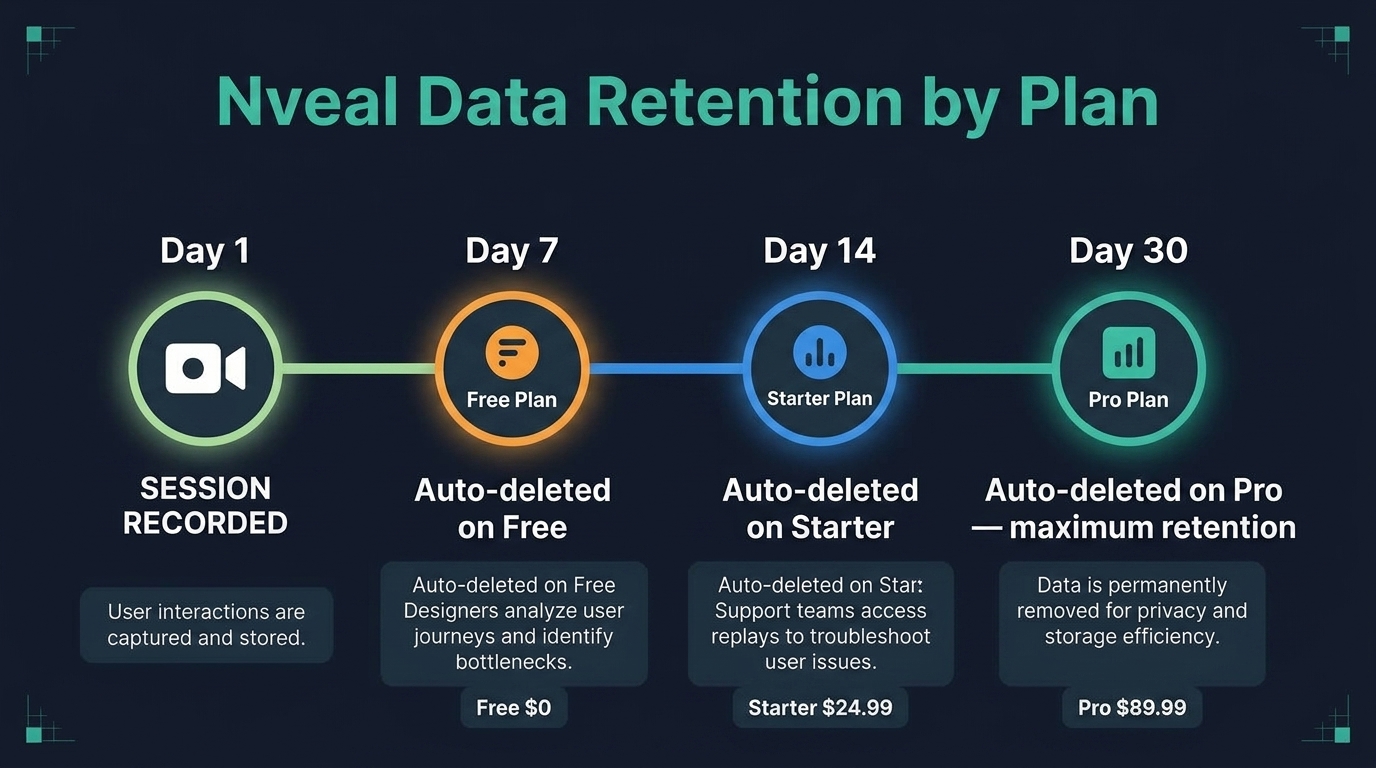
Nveal Retention Limits
Nveal implements automatic data deletion based on your plan. The Free plan retains data for 7 days, the Starter plan for 14 days, and the Pro plan offers maximum retention of 30 days. This automatic lifecycle ensures data is permanently removed for privacy and storage efficiency.
Sampling can reduce both cost and privacy exposure
Do you really need to record every visitor?
Maybe.
But often you don’t.
Suppose your website gets one million sessions every month.
Your team might only need a representative sample to identify UX problems.
Session replay is qualitative data.
You aren’t necessarily trying to calculate an exact conversion rate from the recordings themselves.
You’re trying to understand behavior.
A hundred recordings showing the same checkout problem may be more useful than 100,000 recordings that nobody has time to watch.
Sampling can therefore reduce: * Storage costs * Processing costs * Privacy exposure * Data-management overhead
The CNIL draft specifically discusses random sampling as one approach to limiting the amount of session data collected. (CNIL)
Trigger-based recording can be even more useful
Another approach is to record based on events.
Instead of recording every session equally, you could focus on sessions where something interesting happened.
For example: * JavaScript error * Failed network request * Rage click * Form validation failure * Checkout failure * Repeated navigation * Failed conversion * Support request
This changes the question from:
“Can we record everything?”
to:
“What situations do we actually need to investigate?”
That’s often a much more efficient use of session replay.
It also aligns naturally with data minimization.
The CNIL draft discusses event-triggered approaches and limiting collection to situations where a defined event occurs. (CNIL)
A privacy-first session replay architecture
Putting all of this together, a privacy-conscious implementation might look like this:
                    USER VISITS WEBSITE
                            │
                            ▼
                  ┌───────────────────┐
                  │ Consent Management│
                  │      Platform     │
                  └─────────┬─────────┘
                            │
                 ┌──────────┴──────────┐
                 │                     │
              DENIED                GRANTED
                 │                     │
                 ▼                     ▼
        Replay remains disabled   Initialize Replay
                                         │
                                         ▼
                              Client-side privacy rules
                                         │
                              ┌──────────┴──────────┐
                              │                     │
                           MASK                  BLOCK
                              │                     │
                              └──────────┬──────────┘
                                         ▼
                                  Event collection
                                         │
                                         ▼
                                  Secure transport
                                         │
                                         ▼
                                    Storage
                                         │
                              ┌──────────┴──────────┐
                              │                     │
                        Access controls       Retention rules
                                                    │
                                                    ▼
                                             Automatic deletion
The important thing about this architecture is that privacy isn’t something added after recording.
It is part of the recording pipeline.
A practical engineering checklist
If you’re already running session replay, here’s a useful audit.
1. When does the SDK initialize? Open a fresh browser session. Before making any consent decision, check your network traffic. Is the replay SDK loading? Is it sending events? If your applicable requirements call for prior consent, recording shouldn’t begin before that consent.
2. What exactly leaves the browser? Don’t just look at the dashboard. Inspect the actual network payloads. Look for: * Form values * Text * URLs * Query parameters * User IDs * Browser identifiers * DOM content * Custom properties
You may be surprised by what is being collected.
3. Are sensitive fields protected by default? Test: * Login * Signup * Checkout * Account settings * Customer profile * Support forms
Enter fake sensitive information and verify that it never appears in the recording data.
4. What happens when consent is withdrawn? Don’t assume the CMP handles this automatically. Test it. If the user withdraws consent, does replay actually stop?
5. Who can see recordings? A replay containing user behavior shouldn’t automatically be visible to everyone in the company. Use appropriate role-based access.
6. How long are recordings retained? Find the actual deletion policy. Not the policy someone wrote in a document. The real one. Check the database. Check object storage. Check backups where relevant.
7. Can a specific session be deleted? This can be useful for privacy requests, support workflows and operational cleanup.
8. Are you identifying users unnecessarily? If all you need is behavioral analysis, consider whether persistent identifiers are actually required.
What to look for in a session replay vendor
Choosing a session replay platform shouldn’t be based solely on how smooth the replay looks.
Privacy capabilities should be part of the product evaluation.
Here are some questions worth asking.
Does the platform support consent-aware recording? Can recording remain disabled until the appropriate consent signal is received?
Can sensitive data be blocked before transmission? This is more important than simply hiding it in the dashboard.
Is masking configurable? Can you mask individual elements, fields, forms or entire categories of content?
Are sensitive inputs protected automatically? Passwords and other highly sensitive fields shouldn’t depend entirely on developers remembering to configure every page.
Can retention be configured? Your retention period should match your use case.
Can recordings be deleted? Ideally, you should be able to delete individual sessions as well as expire data automatically.
Can access be restricted? Look for role-based permissions and appropriate security controls.
Can you avoid unnecessary persistent identifiers? A good replay system should support anonymous or pseudonymous analysis where appropriate.
Can recording be limited? Sampling, page exclusions and event-triggered recording can all help reduce unnecessary collection.
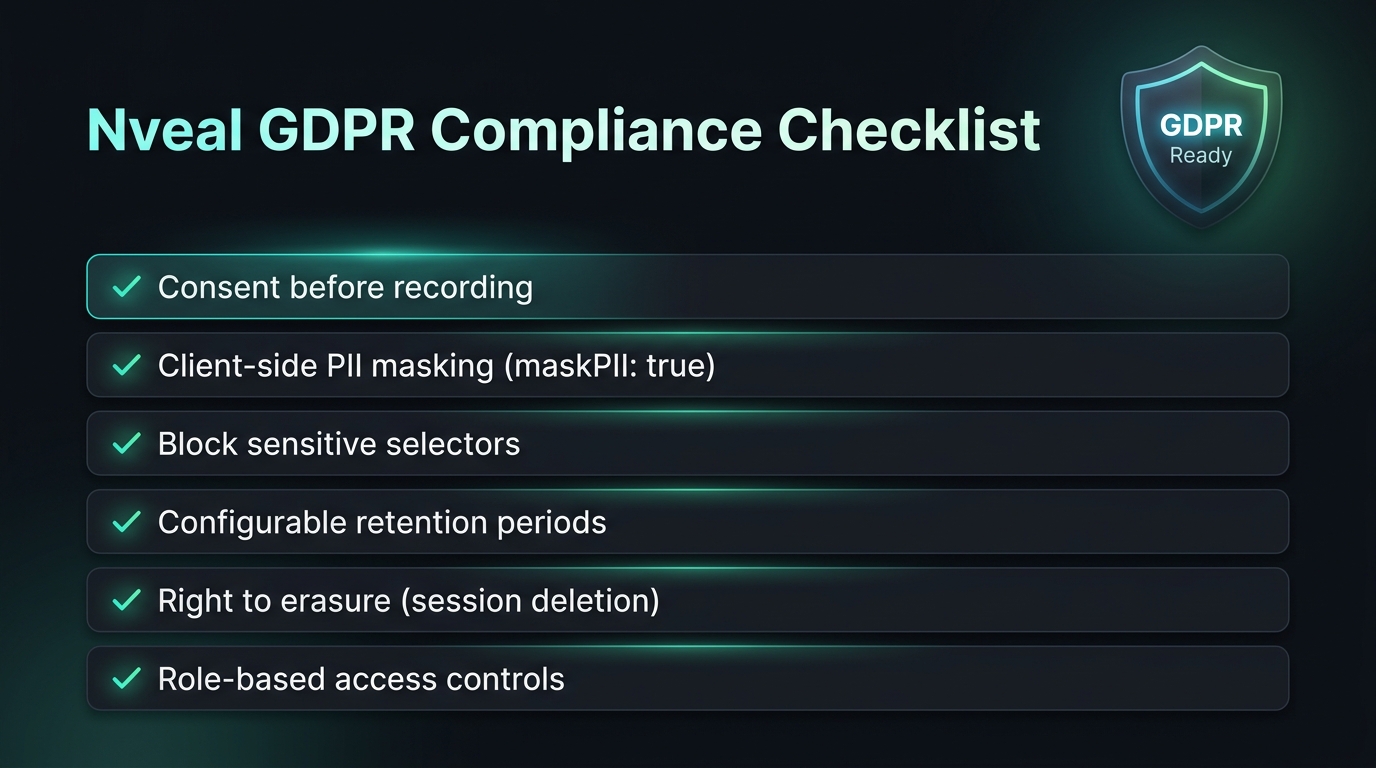
These capabilities don’t make a company automatically compliant.
But they make responsible implementation much easier.
What this means for product managers
Privacy can sometimes sound like something that belongs to the legal department.
It doesn’t.
Product managers make decisions that directly affect what gets recorded.
For example:
“Let’s identify every user so we can see their entire history.”
That is a product decision with privacy implications.
So is:
“Let’s record every session.”
So is:
“Let’s keep everything for two years.”
A better product conversation is:
“What question are we trying to answer?”
Then:
“What is the minimum data we need to answer it?”
That approach often results in better analytics anyway.
Instead of drowning in millions of recordings, teams can focus on the sessions that actually matter.
What this means for developers
For developers, the biggest change is that session replay should be treated as part of the application’s data architecture.
It’s not just a frontend widget.
The replay SDK can observe what happens in the browser.
That means its permissions and configuration deserve the same attention you would give any other system that processes user data.
Before deploying it, developers should understand: * What events are captured * What data is serialized * Where events are sent * How masking works * When recording starts * How consent is communicated * How identifiers are generated * Where data is stored * How deletion works * How long data remains available
If you can’t answer those questions, you don’t fully understand your analytics pipeline.
What this means for security teams
Security teams should look at session replay from another angle.
Every recording is another piece of data that needs to be protected.
That means asking: * Where is it stored? * Is it encrypted in transit? * Is it encrypted at rest? * Who can access it? * Are employees authenticated appropriately? * Are administrative actions logged? * How are vendor integrations controlled? * Are backups subject to the same retention requirements? * What happens if an account is compromised?
The privacy risk isn’t limited to the original collection.
A recording that contains sensitive information becomes another asset that could potentially be exposed.
Which brings us back to the simplest security principle:
Don’t collect what you don’t need.
Can privacy-conscious session replay still provide useful insights?
Absolutely.
This is probably the biggest misconception about privacy-first analytics.
Some teams worry that if they mask everything, wait for consent and shorten retention, session replay will become useless.
It doesn’t have to.
You can still answer questions like: * Why are users clicking this button repeatedly? * Where does onboarding break? * Which step of checkout causes frustration? * Does a mobile layout work correctly? * Are users seeing a JavaScript error? * Are network failures causing abandonment? * Which part of the interface is confusing? * What happens immediately before a conversion failure?
None of those questions inherently require a customer’s password.
They don’t require a credit card number.
They don’t require a complete record of everything the person has ever done on your website.
Good session replay separates behavioral signal from unnecessary personal information.
That’s the real goal.
The future of session replay isn’t less visibility
It’s better-controlled visibility.
For a long time, analytics products competed partly on how much data they could capture.
More sessions. More events. More attributes. More history.
But more data doesn’t automatically mean more insight.
If your team has five million recordings and nobody knows what they contain, you haven’t created five million insights.
You’ve created five million data-management problems.
A better model is emerging.
Collect only what you need. Protect it before it leaves the browser. Give users the appropriate choices. Use anonymous or pseudonymous identifiers when possible. Record fewer sessions when full coverage isn’t necessary. Delete recordings when their purpose has ended. And make privacy controls part of the technical architecture instead of treating them as a configuration exercise at the end of implementation.
What the 2026 landscape means for companies using session replay
The practical lesson from the recent U.S. litigation and European regulatory work isn’t “stop using session replay.”
It’s:
Know what your session replay system is doing.
The 2025 Torres v. Prudential decision shows that the technical mechanics of how replay data is collected and reconstructed can matter to a CIPA claim. (Inside Privacy)
The 2026 BPS Direct decision shows that allegations involving detailed session replay collection can survive an initial standing challenge for some plaintiffs, particularly where the alleged collection involved sensitive information. (Justia Law)
And the CNIL’s 2026 draft recommendation shows that regulators are thinking about session replay as a distinct privacy issue, with specific attention to consent, minimization, masking, identifiers and retention. (CNIL)
None of those developments creates a single universal compliance recipe.
But together, they make one thing increasingly difficult to ignore:
The default configuration of your session replay tool matters.
A privacy-first session replay checklist
Before deploying or reviewing your session replay implementation, ask:
Consent * Have we determined whether consent is required for our users and jurisdictions? * Does the replay SDK remain disabled until the required consent exists? * Can users withdraw consent? * Does withdrawal actually stop recording? * Is the purpose of session replay clearly explained?
Data collection * Are passwords blocked? * Are payment details blocked? * Are sensitive form fields masked? * Are dynamically populated sensitive elements protected? * Are unnecessary user identifiers removed? * Are we collecting only the information needed for our stated purpose?
Recording strategy * Do we actually need to record every session? * Could sampling provide enough insight? * Could event-triggered recording work? * Can sensitive pages be excluded?
Retention * Is our retention period documented? * Is it connected to a specific business purpose? * Are expired recordings automatically deleted? * Can individual recordings be deleted? * Have we considered data stored in backups and secondary systems?
Access * Who can view recordings? * Is access role-based? * Are administrative actions appropriately protected? * Do we know where recordings are stored and processed?
Vendor * Does the vendor provide strong masking controls? * Can sensitive data be blocked before transmission? * Can retention be configured? * Can recordings be deleted? * Does the vendor support consent-aware initialization? * Have we reviewed the vendor’s contractual and data-processing terms?
If you can’t answer these questions, your session replay implementation probably deserves another look.
The bottom line
Session replay isn’t going away.
And it shouldn’t.
Being able to see how users actually experience a product is incredibly valuable. It helps engineering teams find bugs, helps product teams understand friction, and helps UX teams make better decisions.
But the technology has matured.
The question is no longer simply:
“Can we record this?”
It is:
“Should we record this, and what is the minimum information we need?”
Recent U.S. litigation has shown that session replay can create serious privacy and wiretapping questions, particularly when third-party systems capture detailed interactions and potentially sensitive information. (Justia Law)
The CNIL’s 2026 draft recommendation shows that European regulators are also paying close attention to the technology and are addressing session replay specifically rather than treating it as just another generic analytics tool. (CNIL)
The right response isn’t to abandon behavioral analytics.
It’s to build it responsibly.
Use consent where it is required. Don’t start recording before that consent. Mask sensitive information before it leaves the browser. Block data that you never need. Avoid persistent identifiers when they aren’t necessary. Use sampling or event-triggered recording when full coverage isn’t useful. Give your team only the access they need. Set a retention period based on purpose. And delete recordings when that purpose is over.
The best session replay implementation isn’t the one that captures the most data.
It’s the one that gives your team the most useful insight from the least amount of unnecessary data.
That’s where session replay is heading in 2026—and it’s a direction that benefits both product teams and the people who use their products.
Frequently Asked Questions
Is session replay legal in 2026? Session replay itself is not universally illegal. The legal requirements depend on the technology, jurisdiction, purpose, data collected and applicable privacy or communications laws. Recent U.S. litigation demonstrates that particular implementations can face significant legal challenges.
Does session replay require consent? It depends on the jurisdiction and implementation. Organizations should determine the applicable requirements rather than assuming that one rule applies everywhere. In France, the CNIL’s 2026 draft recommendation takes a strong consent-first approach to session replay where applicable exemptions do not apply. (CNIL)
Does CIPA prohibit session replay? Not categorically. CIPA has been used as the basis for lawsuits involving session replay, but courts have reached different conclusions depending on the technology and legal theory. For example, the 2025 Torres v. Prudential decision rejected a particular CIPA Section 631 theory involving how replay events became readable. (Inside Privacy)
What happened in the 2026 Bass Pro Shops session replay case? The Third Circuit reversed the dismissal of claims brought by two plaintiffs who alleged that session replay code captured their interactions and sensitive information, while affirming dismissal for six plaintiffs who had not provided identifying information. The court’s decision focused on Article III standing rather than declaring session replay universally unlawful. (Justia Law)
Is 30 or 90 days the required retention period for session replay? No. There is no universal rule requiring all session replay data to be deleted after 30 or 90 days. Retention should be based on the purpose of processing and applicable requirements. The CNIL’s draft recommendation discusses different retention considerations for different use cases. (CNIL)
Should session replay record passwords? No. Passwords and other highly sensitive information should be excluded from session replay collection.
Is masking enough to protect personal information? Not necessarily. There is an important difference between preventing sensitive data from being collected and hiding it after it has already been transmitted. Whenever possible, sensitive information should be blocked or masked before it leaves the user’s browser.
Should every visitor be recorded? Not necessarily. Depending on the purpose, sampling, page exclusions or event-triggered recording may provide sufficient insight while reducing the amount of data collected.
Can session replay be privacy-friendly? Yes. Consent-aware initialization, data minimization, client-side masking, sensitive-data blocking, limited identifiers, access controls, configurable retention and automatic deletion can significantly improve the privacy posture of a session replay implementation.
What should I look for in a session replay tool? Look beyond the quality of the replay. Evaluate consent integration, privacy-by-default settings, client-side masking, sensitive-data blocking, retention controls, deletion capabilities, access controls, identifier options and the vendor’s data-processing practices.
Is this article legal advice? No. Privacy and wiretapping requirements can vary based on jurisdiction, technology and implementation. This article is intended as general information, not legal advice. Organizations deploying session replay should consult qualified legal counsel about their specific circumstances.